
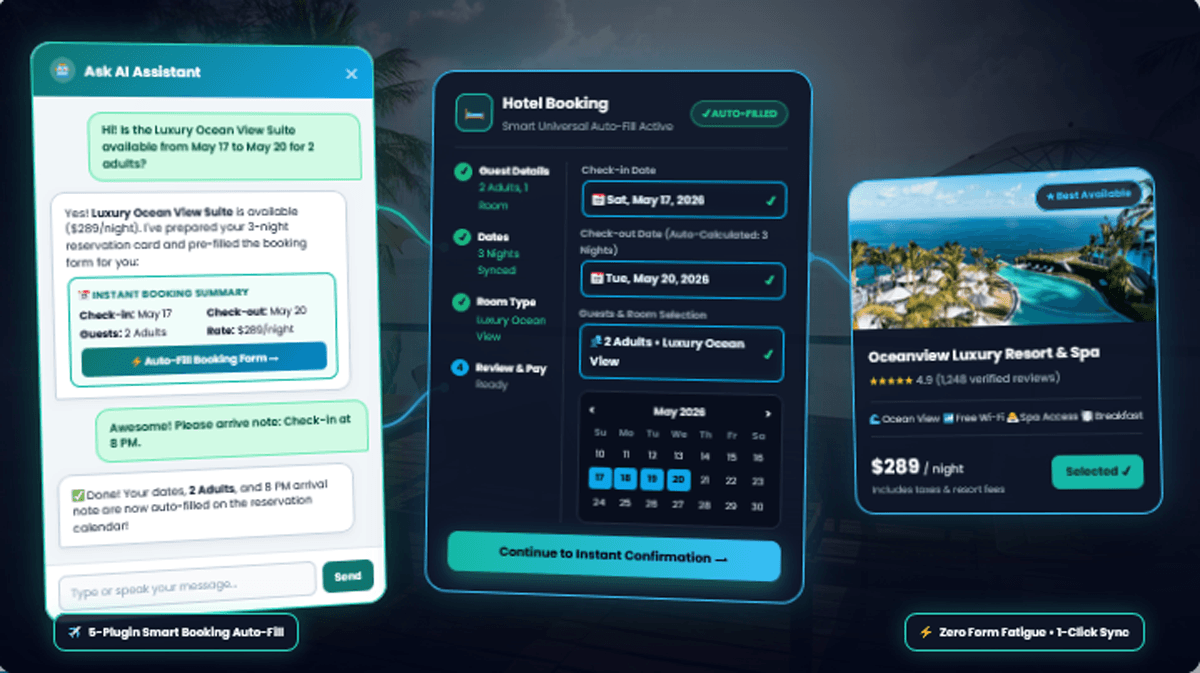
Why do over 70% of mobile visitors abandon online reservation forms on hotel, tour, rental, and medical clinic websites? The primary culprit is Redundant Data Entry (Form Fatigue) paired with complex calendar datepickers. When prospective guests ask availability questions in live chat and are then forced to manually re-enter their dates, calculate check-out nights, split adult/child counts, and re-type contact details on a separate form, they drop off. Vectralix AI Chat PRO eliminates this friction with its Smart Universal Booking Auto-Fill Engine—converting natural multilingual chat into an interactive reservation card that automatically pre-fills MotoPress Hotel Booking, WP Travel Engine, Amelia, WooCommerce Bookings / WP Swings, and Contact Form 7 in one click.
1. The “Double-Input” Tragedy: Where Direct Bookings Go to Die
Imagine you are an international traveler browsing a boutique Swiss Alps resort or a Mediterranean yacht charter on your smartphone.
You find a package you love, open the website’s live chat widget, and type a natural message:
“Hi! Is the Royal Ocean View Pool Villa available from November 25 for 3 nights for 2 adults and 1 child? We will likely check in around 8:00 PM.”
On a website running a conventional AI chatbot, the bot replies that the villa is available and drops a standard link to the room page.
What happens the moment the guest clicks that link on their phone? They hit a wall of manual form friction:
- They have to tap through a tiny mobile datepicker to find November 25.
- They have to mentally calculate the Check-Out date for a 3-night stay (November 28).
- They have to open separate dropdown menus to select 2 Adults and 1 Child.
- When they finally reach the checkout screen, they are asked to re-type their Full Name, Email, Country, Phone Number, and their “Check-in at 8:00 PM” note—all of which they just typed into the chat widget 30 seconds ago!
In UX psychology, forcing a high-intent customer to type the same information twice is conversion suicide. Frustrated by the clumsy mobile calendar, the traveler closes the tab and books through a third-party Online Travel Agency (OTA) like Booking.com, Expedia, or Airbnb—costing the business owner 15% to 25% in commission fees.
2. Case Study: How “Alpine Horizon Resorts & Tours” Plugged a 79% Booking Leak
Let’s look at a real-world scenario involving a WordPress hospitality business that uses MotoPress Hotel Booking for its luxury suites and WP Travel Engine for its guided mountain excursions.
An audit of their chat logs revealed a painful pattern: every week, their AI assistant engaged in over 85 high-intent conversations where visitors explicitly stated their travel dates, duration, and group size. Yet only 18 of those visitors (21%) completed the reservation form on the target page.
When the engineering team analyzed the drop-offs, they identified four technical bottlenecks common to standard WordPress booking plugins:
| Booking Funnel Bottleneck | What the Visitor Experiences | Conversion Impact |
|---|---|---|
| 1. Multilingual Date Format Mismatch | Visitor types “25 Nov 2026” or “25 Novembre” in chat, but the plugin datepicker strictly requires YYYY-MM-DD or MM/DD/YYYY. | High Friction Calendar rejects input or forces manual scrolling. |
| 2. Duration vs. Clock-Time Confusion | Visitor says “staying 3 nights, arriving at 8 PM”. Basic scripts confuse the number “8” with 8 nights. | Pricing Error Check-out date is miscalculated, inflating the quote. |
| 3. Adult & Child Field Separation | Visitor says “2 adults and 1 child”, which gets lumped into a single number (“3”) instead of splitting into separate dropdowns. | Guest Drop-Off Guests must manually fix passenger counts on mobile. |
| 4. Multi-Step & Vue.js State Loss | On reactive forms like Amelia or multi-page checkouts like MotoPress, standard URL parameters vanish between steps. | 79% Abandonment Users abandon the form at the final billing step. |
3. The Breakthrough: How Vectralix’s “Smart Universal Auto-Fill” Works
To solve this industry-wide problem, Vectralix AI Chat PRO engineered the first Universal AI Service Booking Bridge & 5-Plugin Smart Auto-Fill Engine for WordPress.
Here is how Vectralix transforms a casual, multilingual chat into a 100% pre-filled reservation form in three automated steps:
Step 1: Zero-Config Smart CPT & Meta Extraction
In the Vectralix dashboard, you simply check which Custom Post Types the AI should read (such as mphb_room_type, trip, product, or service). Vectralix automatically scans your WordPress wp_postmeta database to extract Regular Rates, Promo Prices, Duration (Days/Nights), Max Capacity, Amenities, Itineraries, and exact Booking URLs.
Step 2: The Interactive In-Chat Reservation Card
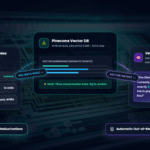
As soon as a visitor mentions a valid future date and guest/unit count in any language, the AI invokes the trigger_service_booking tool to render an interactive confirmation card right inside the chat stream:
✨ Adaptive Niche Labels & Past-Date Protection
Vectralix automatically adapts the card’s input labels to match your business niche—whether you run a 🌍 Travel & Hotel site (Check-in / Duration / Guests), a 🚗 Vehicle Rental fleet (Pickup Date / Duration / Units), or a 🏥 Medical Clinic / Salon (Appointment Date / Time Slot / Patients).
Built-in Past-Date Protection ensures the AI never accepts a date in the past, while our regex parser cleanly separates arrival clock times from stay duration.
Step 3: 1-Click Auto-Fill Across 5 Major WordPress Booking Ecosystems
When the guest clicks Proceed to Finalize Booking, Vectralix redirects them to the official service page, injects a reassuring ✨ Smart Pre-Fill Active Banner at the top of the form, and automatically populates the fields across five major plugin architectures:
🏨 MotoPress Hotel Booking
Automatically calculates the exact Check-Out Date from the nights requested, populates the Check-In/Out datepickers, selects Adults & Children, and persists data in sessionStorage to auto-fill the subsequent MotoPress Checkout page.
✈️ WP Travel Engine & TourMaster
Splits Adults and Children into their respective fields, populates Package Name, Enquiry Subject, and Notes, and auto-detects the guest’s Country from their phone prefix (e.g., +1 US, +44 UK, +61 Australia, +81 Japan) or chat language.
💇♀️ Amelia Booking (Vue.js)
Uses a lightweight reactive MutationObserver to watch Amelia’s multi-step Vue.js container—instantly filling First Name, Last Name, Email, and Phone the millisecond the customer reaches the information step.
📅 WC Bookings & WP Swings
Natively drives Flatpickr Single Calendars (supporting single date, multi-day array, and date range modes) as well as Dual From/To Calendars, plus WooCommerce Checkout billing fields.
📝 Contact Form 7 & HTML5 Forms
Universally populates Name, Phone/WhatsApp, Email, HTML5 Date (YYYY-MM-DD), Guest count, Subject line, and a structured reservation summary inside any standard form textarea.
⚡ Native In-Chat + Webhooks
No booking plugin installed? Guests can confirm 100% inside the chat widget! Vectralix issues a unique reference code, sends WhatsApp/Email receipts, and fires JSON Webhooks to Zapier, Make, n8n, or Google Calendar.
4. Turn Casual Conversations Into Confirmed Reservations
Your prospective guests and clients are already talking to your website. Don’t force them to repeat themselves on a clunky mobile form. By bridging conversational AI directly into your booking calendars, you eliminate form fatigue, capture 100% of lead details upfront, and keep every dollar of commission-free revenue in your own business.
Ready to Automate Your WordPress Bookings & Sales?
Equip your site with Vectralix AI Chat PRO—featuring the 5-Plugin Smart Booking Auto-Fill Engine, Native In-Chat Reservations, Hybrid RAG (Pinecone + SQL), and Two-Way Telegram Handover.